How to Send Professional Emails for CIBIL Correction?

We understand that sending formal emails for CIBIL correction can feel overwhelming if you're not familiar with the process. Many Indians hesitate at this crucial step not because they lack access to email, but because they're unsure about the proper format and approach for official financial communications. This comprehensive guide will walk you through the entire email-sending process, whether you're using your mobile phone or desktop computer.
Why Email Communication is Essential
Before we dive into the practical steps, let's understand why email serves as your most powerful tool in credit report correction. Unlike phone calls that leave no paper trail, emails provide documented proof of your communication with lenders and credit bureaus. They create a timestamped record that becomes crucial if you need to escalate matters or demonstrate your proactive approach to resolving errors.
Through our experience assisting thousands of users, we've consistently found that well-drafted emails significantly increase the chances of getting errors corrected promptly. The systematic approach we share today has proven effective across all major credit bureaus and lending institutions in India.
Preparation: Gathering Your Documents
Begin by collecting all necessary documents before starting the email process. You'll need your credit report with the errors clearly highlighted, relevant loan statements or payment proofs, your personal identification details, any previous correspondence, and supporting documents that substantiate your case. Having these materials ready ensures a smooth and efficient email drafting experience.
Desktop Email Process: Professional Approach
For those using desktop computers, we recommend starting by opening your preferred web browser and navigating to your email provider's website. Since most users already maintain an email account, we suggest using your existing registered email ID rather than creating a new one. This maintains consistency in your communication trail.
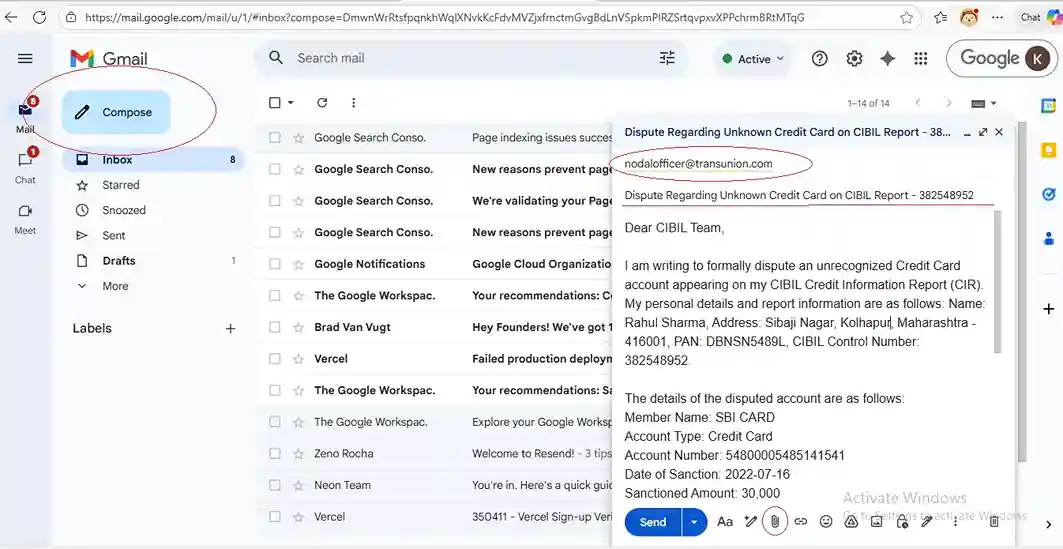
Click the Compose button to open a new message window. In the recipient field, enter the official email addresses of both the credit bureau and the concerned lender. For CIBIL, use nodalofficer@transunion.com and escalationdesk@transunion.com while for lenders, you'll need to visit their official website to find their specific grievance redressal email ID. If you want to save time searching, we've compiled all the necessary email addresses in our Financial Institution Email List for quick reference.
Crafting an appropriate subject line is crucial for your email to be taken seriously. We recommend using a clear and professional format such as "Dispute Regarding Credit Report Error - [Your Name] - [Loan Account Number]". This immediately communicates the purpose and importance of your email to the recipient.
When writing the email body, start with a formal salutation and proceed with a clear, concise explanation of the error. Specify the incorrect entry, state what the correct information should be, and mention the supporting documents you've attached. If you're unsure about how to structure this professionally, our Drafting Tool can help you create a perfectly formatted email in minutes. Maintain a professional tone throughout, avoiding emotional language or accusations. Remember to include your full name, date of birth, PAN number, and the specific loan account number in dispute.
Before sending, use the attachment function to include all your supporting documents. Ensure files are clearly labeled and in readable formats, with PDF being the preferred option. Review your entire email for any spelling errors, verify that all attachments are included, and then proceed to send the message. Don't forget to save a copy in your sent folder for future reference.
Mobile Email Process: On-the-Go Efficiency
For smartphone users, the process remains equally effective though slightly different in execution. Start by opening your email application, which for most Android users will be Gmail, while iPhone users typically use the native Mail app. The assumption here is that you're already logged into your email account, as most smartphone users maintain active email sessions on their devices.
Tap the Compose button, usually represented by a pencil or plus icon, to begin a new message. Carefully enter the recipient email addresses, double-checking for any typing errors since mobile keyboards can sometimes lead to mistakes. Apply the same professional subject line format as recommended for desktop users.
When composing the email body on your mobile device, pay extra attention to maintaining proper formatting and professional language. The tendency to use informal communication on mobile devices is common, but you must resist this when dealing with financial matters. Break your content into short, readable paragraphs while ensuring you include all necessary details and maintain a respectful tone throughout.
Attaching documents on mobile requires tapping the attachment icon and selecting your prepared files from their storage locations. This might involve choosing from Google Drive, your photo gallery, or other file management apps on your device. Wait for the files to upload completely before proceeding.
Before sending, scroll through your entire email to review the content and verify all attachments are included. Once satisfied, tap the send button and wait for confirmation that your message has been successfully delivered.
Essential Tips for Effective Communication
Through our extensive experience helping users with credit report corrections, we've identified several crucial elements for successful email communication. Maintaining a professional tone while sticking to facts proves far more effective than emotional appeals. Being specific and concise in your explanation helps ensure your email gets the attention it deserves.
Always include complete identification details and the specific loan account number in dispute. If you don't receive an acknowledgment within seven working days, send a polite follow-up email referencing your original communication. Most importantly, document everything by saving all sent emails and responses in a dedicated folder within your email account.
Common Pitfalls to Avoid
We've observed several common mistakes that can delay resolution of credit report errors. These include sending emails without proper subject lines, forgetting to attach supporting documents, using informal language or abbreviations, and failing to include complete identification details. Another frequent error is sending the same email multiple times in frustration, which often leads to further delays in processing.
Moving Forward After Sending
After sending your emails, maintain regular monitoring of your inbox for responses. Most financial institutions respond within seven to ten working days. If you don't receive a response within this timeframe, our follow-up strategies can help you escalate the matter appropriately while maintaining professional decorum. Remember that the power to correct your credit report lies in your hands. With these email writing skills, you're now equipped to communicate effectively with financial institutions and take control of your credit health. At CreditReveals, we believe in empowering you with practical knowledge that transforms complex processes into manageable tasks.
Whether you choose to use your mobile device or desktop computer, these guidelines will help you send professional emails that get results. Your journey toward accurate credit reporting begins with confidently hitting that send button, knowing you've communicated your case effectively and professionally.
0 Comments

No comments yet. Be the first to share your thoughts!